50 Minutes, One Agent, and the Road to Gas Town
I build multi-agent systems with persistent memory and orchestration. For a voice-to-text tool, I used one CLI session and one prompt. The interesting part is why.
I talk to my computer constantly, not in a “hey Siri” way but in full paragraphs and long prompts and entire trains of thought that I don’t want to type out character by character, because voice-to-text is how I work and how I think, so when I switched from macOS to Linux the very first thing I noticed was the silence.
On macOS I was using Wispr Flow, which is this really simple push-to-talk setup where you hold a button, talk, release, and the transcribed text just appears wherever your cursor is, and it was so embedded in how I worked that losing it felt like going back two years. But Wispr Flow doesn’t exist for Linux, and neither does SuperWhisper, and while there are open-source alternatives out there I found myself stuck on a different question entirely: how fast could I build exactly what I want?
So instead of spending an afternoon evaluating alternatives, I opened Claude Code and typed one sentence:
Can we create something similar to Wispr Flow for Linux? I just want to press a button and say something in English or Portuguese and have it paste when I release the button.
That was the whole thing, because Claude already knows what these products are, so I didn’t need to spec anything out, I just entered plan mode, looked at the architecture it came back with, thought “yeah, that looks right for something this small,” and let it run while I went back to the evals I was running on another project. 23 minutes later it came back with a compiled Go binary that had audio capture, Whisper API integration, clipboard management, global hotkey support, and test coverage, and I thought okay, let’s see if this actually works.
It didn’t paste.
Working Product
The Ask · 1 sentence
Plan + Code · 23 min
Debug Wayland Paste · 26 min
Polish + Evolve
Better model (Groq) · 7 min
Tray icons · 18 min
OpenAI backend · 5 min
Vocabulary system · 5 min
History & click-to-paste · ~5 min
Runtime config switching · ~5 min
Translation mode · ~5 min
Toggle mode & ESC cancel · ~5 min
Hallucination fixes · ~5 min
Security & test coverage · ~5 min
Where the AI stopped and I started
Pop!_OS runs the COSMIC desktop on Wayland, which is a cutting-edge compositor, and what I didn’t realize at the time is that most Linux tools for simulating keyboard input still assume X11, so what followed was 26 minutes of me and Claude trying one thing after another:
- xdotool — X11 only, silent failure on Wayland
- ydotool — needs ydotoold daemon running, which it wasn’t
- wtype — needs wlr-virtual-keyboard protocol, which COSMIC doesn’t support
- dotool — compiled from source, same protocol issues
- ydotool type — ASCII only, garbled any UTF-8 text (which I need for Portuguese)
Five tools, five completely different failure modes, and this is the part that I find really interesting because Claude could write code and run unit tests on its own without any help from me, but it couldn’t look at my screen and tell me whether text had actually appeared in the right window, so I became the integration test, checking after every attempt and saying “nope, still nothing, try something else,” and that back-and-forth is what debugging with AI actually feels like when you’re past the point where unit tests can help you.
The breakthrough was kind of accidental, because at some point all the queued test pastes from previous attempts suddenly appeared at once, and that’s when we figured out that COSMIC needs about 2 seconds to recognize a new virtual keyboard before it starts accepting input from it, so the fix was to pre-warm a uinput virtual keyboard at startup using Go’s bendahl/uinput library, give COSMIC those 2 seconds to register it, and then use wl-copy for the clipboard and simulate Ctrl+Shift+V through the pre-warmed keyboard. Not elegant, but it works.
When it stopped being an experiment
The first version was using a local Whisper model that was about 147MB and the transcription quality was, let’s say, creative:
What I said: “Can it detect if it’s a terminal window or not and paste it”
What it heard: “If the tech defeats a turn my window will not and paste it”
So I told Claude to switch to Groq’s free API running whisper-large-v3 and the difference was instant, and then I tested it in Portuguese just to see what would happen:
Será que ele consegue entender o que eu falo em português também? Nossa, ele é bem rápido! (Can it understand what I say in Portuguese too? Wow, it’s really fast!)
Perfect transcription, both languages, free, and that’s the moment it stopped being a fun experiment and turned into something I’d actually use every day.
The first tray icon used color-coded dots for idle, recording, and transcribing, but I’m color blind so those were all just dots to me, and I asked for shape-based indicators instead:
Now I can tell the state at a glance. After that I just kept going, because every feature was about 5 minutes of conversation with the agent:
- Vocabulary system for custom words and project names
- Swap the entire transcription backend from Groq to OpenAI
- History panel that remembers recent transcriptions with click-to-paste
- Runtime config switching from the tray, no restart needed
- Translation mode that detects the language and outputs English
- Toggle recording with a double-tap instead of holding the key
- ESC to cancel a recording mid-sentence
- Hallucination fixes for silence detection
- Security hardening
- Test coverage
When you own the code, every change is a conversation, not a feature request in someone else’s backlog.
The road to Gas Town
A few weeks before building sussur.ai I discovered OpenClaw, which is an open-source autonomous AI agent that runs locally and connects to your messaging apps, and I was amazed by what it could do but the experience of actually using it was rough, because it was hard to configure and it crashed a lot and it burned through tokens faster than I could keep up with. But the capabilities were real, and I wanted to understand how that kind of system works at the code level, so instead of fighting with someone else’s tool I started building my own, something smaller and focused on what I actually needed: a bot I can give personality to, with a controlled system prompt and persistent memory and the ability to do work and validate it, with Telegram and Slack integrations and a pipeline workflow that lets agents coordinate with each other.
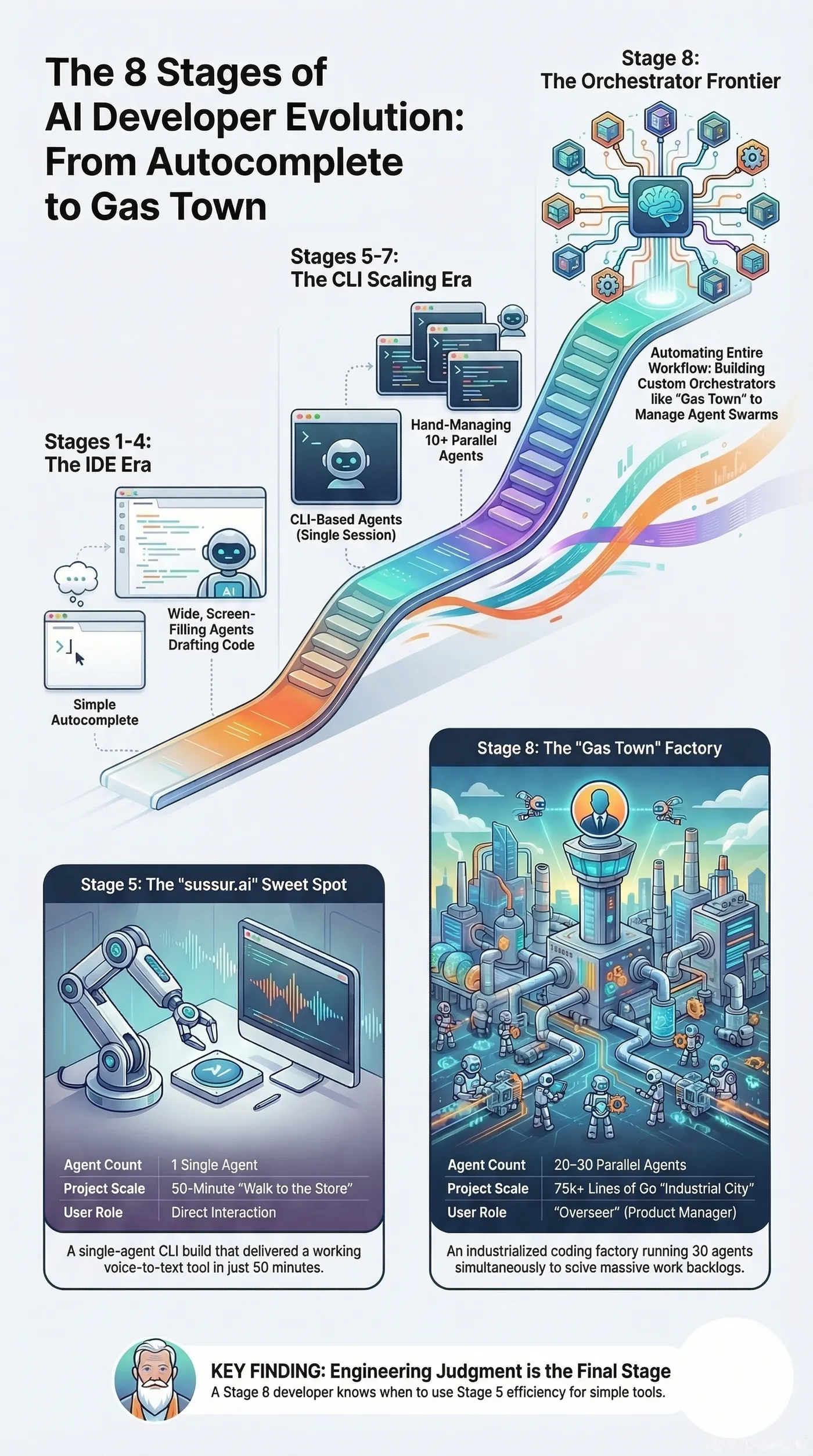
And then a few days ago I found Steve Yegge’s Gas Town essay on LinkedIn, and it kind of blew my mind. Gas Town is this system he built where 20 to 30 AI coding agents run in parallel, organized into a hierarchy with a Mayor that dispatches work, ephemeral workers that handle individual tasks, a Witness that supervises them, and a Refinery that manages merge conflicts, all backed by persistent state in Git so agents can crash and pick up where they left off. It’s 189,000 lines of Go. It’s like someone built an entire city where the residents are coding agents and the infrastructure is designed to keep them productive without human babysitting.
Reading it was one of those moments where you realize you’ve been walking toward a place without knowing it had a name, because he describes this evolution from basic autocomplete all the way to building your own orchestrator, and I looked at what I’d been building and thought “I was already on this road, I just didn’t know where it led.”
But sussur.ai didn’t need any of that. All that orchestration and complexity would have been like driving to Gas Town when I just needed to walk to the corner store, because it was one prompt, one CLI agent session, and about 50 minutes of my time, and I could do it while working on two other things simultaneously. And I think that’s what I find most interesting about Yegge’s evolution model, because the stages he describes seem to work really well as a toolbox where you pick the right level for the problem you’re solving, and for sussur.ai the right level was a single agent and my attention split three ways.
The tool
I named it sussur.ai, from “sussurro,” which is Portuguese for whisper. I use it every day and it’s how I dictated parts of this post, and it doesn’t have a fancy UI or an onboarding flow but it does exactly what I need: press a button, talk, text appears, and when I want to change something I just ask.
As for the system I built to try to replicate what OpenClaw could do, it ended up becoming something I didn’t expect, because instead of just a coding tool it turned into my personal assistant that helps me with hobby projects, manages my social media, handles day-to-day tasks, and accelerates my learning in ways I couldn’t have predicted, and all those little side projects that I’d been carrying around in my head for years and never finished are now going from idea to working software in minutes, just like sussur.ai did. But that’s a story for another post.